
App Authentication Function
App authentication method
Even when you use the Direct Banking Service on a device other than a smartphone, you may need to have your smartphone at hand to operate the app.
- *The operating procedure is the same as that for using the Direct Banking Service on a smartphone.
The app authentication method differs depending on the content of the transaction.
Ex. 1) When logging on to the Direct Banking Service
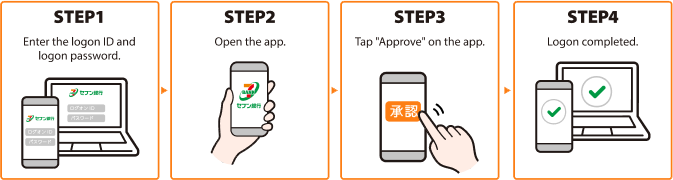
Details on how to use
-
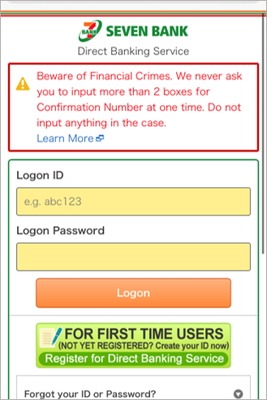
1.Open the logon screen for the Direct Banking Service on your smartphone or computer browser, enter your logon ID and logon password, and tap the "Logon" button.
* For security reasons, you need to compete the procedure up to Step 9 within three minutes after tapping the "Logon" button.
-
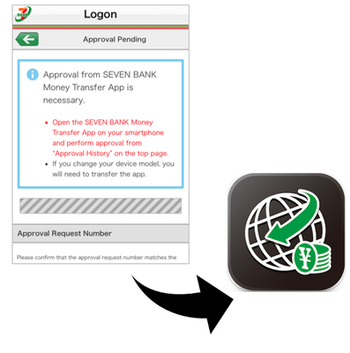
2.When the "Approval Pending" screen is displayed, open the Seven Bank Money Transfer App.
-
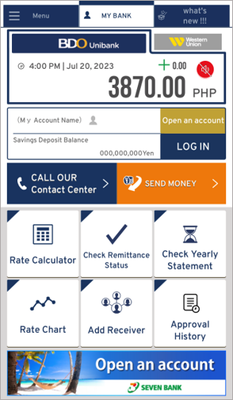
3.Make sure that the top page of the app is displayed.
* Do not log onto the app by tapping the logon button on the top page (which means you should not have your account number or other account information displayed on the top page).
-
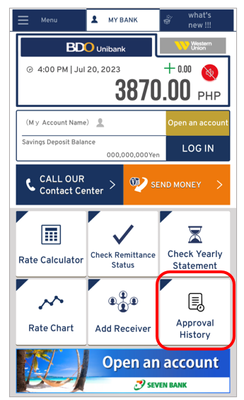
4.Tap the " Approval History" button on the lower right of the top page of the app.
-
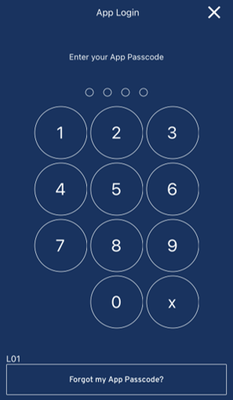
5.Enter your app passcode (4-digit number).
-
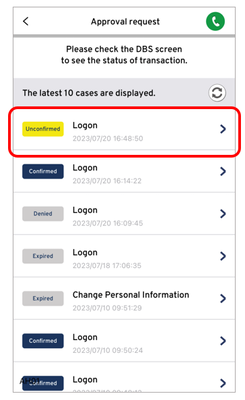
6.Select the appropriate transaction (Unconfirmed/Logon).
-
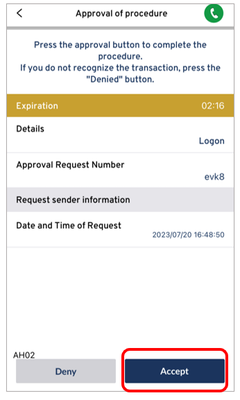
7.Tap the "Accept" button if the information displayed is correct.
-
8.When the approval request screen is displayed, make sure that the appropriate transaction is in the "Confirmed" status, then, close the app and go back to the Direct Banking Service screen (internet browser) displayed in Step 2.
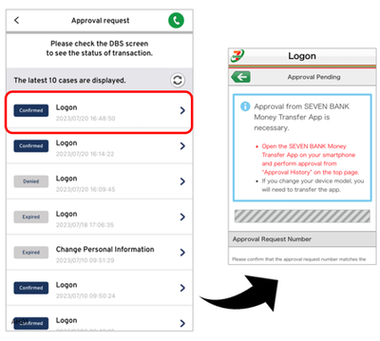
-
9.After you go back to the logon screen for the Direct Banking Service, wait for a few seconds without doing anything.
The home screen will be displayed automatically.
Now the logon procedure has been completed.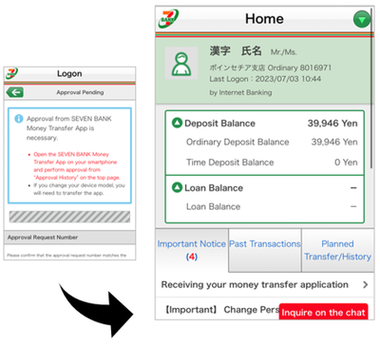
Ex. 2) When making a money transfer
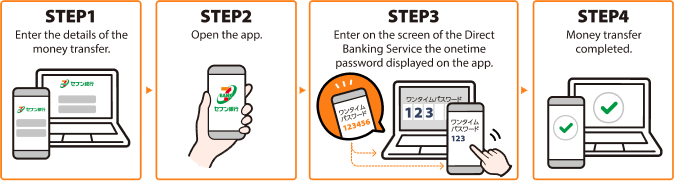
Details on how to use
-
1.Enter the details of the money transfer on the Direct Banking Service screen, and tap the "Approve by the App" button.
* For security reasons, you need to compete the procedure up to Step 11 within three minutes after tapping the "Logon" button.
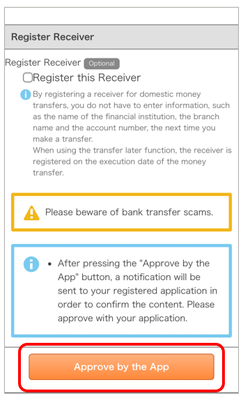
-
2.When the "Approval Pending" screen is displayed, open the Seven Bank Money Transfer App.
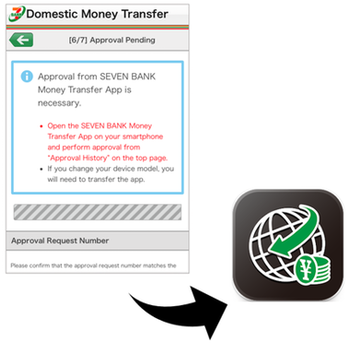
-
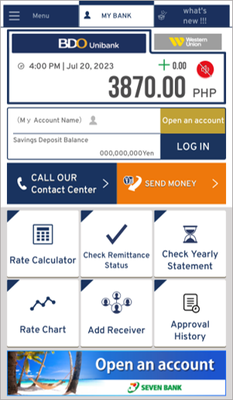
3.Make sure that the top page of the app is displayed.
*Do not log onto the app by tapping the logon button on the top page (which means you should not have your account number or other account information displayed on the top page).
-
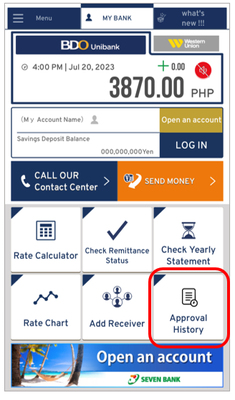
4.Tap the " Approval History" button on the lower right of the top page of the app.
-
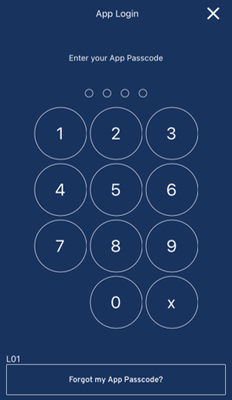
5.Enter your app passcode (4-digit number).
-
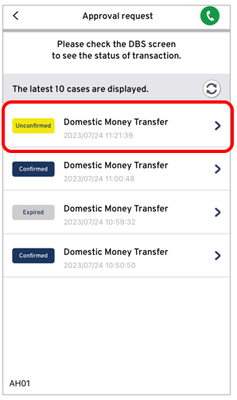
6.Select the appropriate transaction (Unconfirmed/Logon).
-
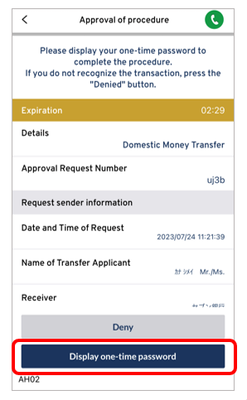
7.Tap the "Display one-time password" button if the information displayed is correct.
-
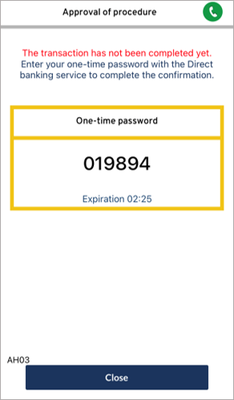
8.Memorize the one-time password displayed on the app screen.
- *Do not tap the "Close" button on the lower part of the screen.
-
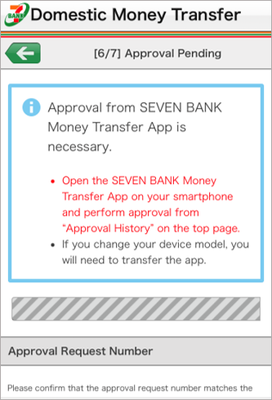
9.Go back to the Direct Banking Service screen (internet browser) displayed in Step 2.
- * In order to display the Direct Banking Service screen (browser), you need to switch from the app to the browser.
-
10.After you go back to the screen in Step 9, wait for a few seconds without doing anything. The one-time password entry screen will be displayed automatically.
Enter the one-time password and tap the "Transfer" button.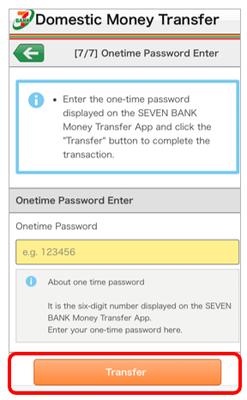
-
11.The screen to notify you of completion will be displayed.
Now the money transfer procedure has been completed.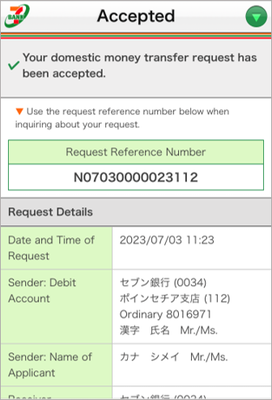
About the App Authentication Function
App authentication is an authentication method whereby customers take the steps to express their
approval using My Seven Bank App or Seven Bank International Money Transfer App when
they conduct transactions via the Direct Banking Service using their computer or smartphone.
By
this method where customers register transactions via the Direct Banking Service (first route) and
then approve the transactions via the app (second route), they can prevent unauthorized transactions
even in the event that their password is stolen by a third party.
For security in using the Direct Banking Service, please use app authentication.
If you have not set up the Seven Bank International Money Transfer App, complete the app settings.

App authentication registration method
The authentication method for the Direct Banking Service will be changed by setting up the Seven Bank
International Money Transfer App or updating the app to the latest version.
How to set up the Seven Bank International Money Transfer App
Seven Bank Account
Customers who do not have a Seven Bank Account must
open an account (free of charge).
Register for Direct Banking Service
Customers who are not resgistered
to use Direct Banking must register for this service.
- *If you use the Direct Banking Service for the first time, please first set
up the Seven Bank International Money Transfer App and register to use the service.
How to set up the Seven Bank International Money Transfer App