
Phone authentication
Phone authentication function
Phone authentication is an authentication method performed when conducting transactions via the Direct Banking Service on your computer or smartphone, using your phone number registered with Seven Bank.
Eligibility to use phone authentication
If you have completed registration for the Direct Banking Service but are unable to use the My Seven Bank App or Seven Bank International Money Transfer App due to unavoidable circumstances or are unwilling to use them, then you can use phone authentication, provided that you complete Seven Bank’s prescribed procedure to change the authentication method.
However, phone authentication is not available if your phone number registered with Seven Bank does not match the phone number of the device you are currently using.
In such case, you need to personally follow the procedure to change your registered phone number before using phone authentication.
Please note that, to use phone authentication, you need to contact the Contact Center and follow the particular procedure to change the authentication method.
How to switch to phone authentication
Procedure by phone
Call the Contact Center and tell the operator that you wish to change the authentication method and why.
Procedure by Chat Support
- 1.Click the button below to open the Chat Support pop-up window, and select “Connect to operator” from the menu.
- 2.Click “Start inquiries” to connect with the operator in charge.
- 3.Tell the operator via online chat that you wish to change the authentication method and why.
The authentication method to use the Direct Banking Service may automatically be switched from app authentication to phone authentication in such circumstances as where the app authentication function is unavailable for long hours due to maintenance.
When app authentication is unavailable due to maintenance, customers who usually use app authentication can use phone authentication.
How to log on to the Direct Banking Service using phone authentication

-
-
STEP1
Be ready to call
-
Have your phone at hand so that you can call from your registered phone number at a later step.
-
-
-
STEP2
Enter your logon ID and logon password
-
Enter your logon ID and password on the logon screen of the Direct Banking Service, and click the logon button.
-
-
-
STEP3
Call the phone number for authentication
-
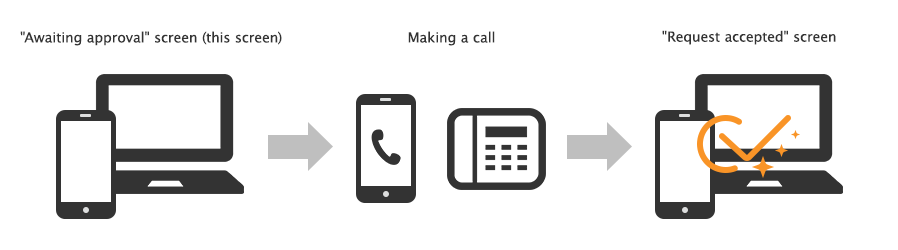
Call the phone number for authentication displayed on the screen of the Direct Banking Service, within two minutes.
- *Phone authentication is not possible if you are unable to call from your registered phone number.
- *The call will be disconnected automatically. You do not need to talk on the phone. There is no charge for the call.
-
-
-
STEP4
Screen transition
-
When authentication is complete, you will be taken to the next screen automatically.
-
-
-
STEP5
Logon complete
-
When the home screen of the Direct Banking Service appears, it means logon is complete. You may need to perform phone authentication again depending on the procedure. In that case, please take Step 3 and Step 4 again.
-
Important notes for using phone authentication
Limitation on the maximum amount of transfers
For a customer using phone authentication, the maximum amount of transfers is automatically limited to 500,000 yen.
The Seven Bank may lower that limit below 500,000 yen at its discretion without prior notice to the customer.
Phone authentication is not available in the following cases
- -you are unable to call from your registered phone number;
- -your account is subject to restrictions on transactions;
- -you have configured the settings to use the My Seven Bank App or Seven Bank International Money Transfer App;
- -the validity period for phone authentication (90 days in principle) has expired
- -in other cases
Phone authentication is not available for the following transactions
- -Registration for the Direct Banking Service
- -Account Linking Service (register a Seven Bank account, add money to charge a cashless payment card or account, etc.)
- -Seven Bank Philippine Money Transfer Service with BDO Unibank
If you have a problem when conducting a transaction via the Direct Banking Service
If you forgot your logon ID
or password
To phone authentication users:
If you forgot your logon ID, click here to reset your ID.
If you forgot your logon password or your logon password has expired, click here to reset your password.
- *If you use the Seven Bank International Money Transfer App, log on to the Direct Banking Service via the app and go to “Customer Service” to reset your ID or password.
If your phone number has changed
You can change your registered phone number by the following methods.
(1) Via a Seven Bank ATM(if your former phone number is no longer available)
You can change your registered phone number using a Seven Bank ATM.
Bring your cash card to the nearest Seven Bank ATM and complete the procedure.
For more information, see Change registered information at the 【ATM madoguchi】.
(2) Via the Direct Banking Service (if your former phone number is still available)
Log on to the Direct Banking Service.
Select “Change registered information” on the “Customer Service” menu to change your registered phone number.
(3) By paper form (sent by mail)
(1) If you have difficulty conducting the procedure via (1) a Seven Bank ATM or (2) the Direct Banking Service, please contact the Contact Center, which will accept your request for sending a necessary form to change your registered phone number.
- *Please ensure that your personal information registered with Seven Bank is kept up to date.
To enhance security, app authentication is recommended
In principle, we recommend our customers perform app authentication when conducting transactions via the Direct Banking Service.
Customers using phone authentication are subject to restrictions on some transactions for security reasons. Please use app authentication if possible.
Related terms and conditions and service outline